.png%3Fprefix%3Dcms%252Fbrevlin-site%252Fmedia&w=3840&q=75)
Over 75 percent of marketplace shoppers browse and buy on mobile. If your listing was designed on desktop and reviewed on desktop, it is converting at a fraction of its potential on the screen where most of your buyers actually are. Here is what to fix and how to fix it.
- Mobile commerce hit $2.51 trillion in 2025 and represents 59 percent of global e-commerce sales; sellers designing for desktop are optimizing for a minority of their actual traffic
- The first 80 characters of your title are all most mobile buyers see; leading with brand name or secondary features instead of the primary keyword and benefit costs you clicks before buyers reach your listing
- Mobile layouts collapse bullet points to two visible by default; your most persuasive benefit and strongest trust signal must appear in bullets one and two to reach mobile buyers without requiring extra taps
- Infographic images with small text are unreadable at mobile scale and actively hurt conversion; every image must be tested at thumbnail size before publishing
- A+ Content appears more prominently on mobile than on desktop, making it a high-leverage conversion asset when designed with short headlines, strong visuals, and minimal text density
Introduction
Mobile has already won. This is no longer a prediction or a trend to prepare for. It is the present reality of online shopping, and sellers who have not restructured their listings around it are paying for that gap with every scroll-past, every bounce, and every sale that goes to a competitor whose listing was built for the screen their buyer was actually holding.
The numbers make this impossible to ignore. Global mobile commerce hit $2.51 trillion in 2025, accounting for roughly 59 percent of total global e-commerce sales. On Black Friday 2025, mobile crossed 70 percent of all e-commerce sales for the first time on a major shopping event. In the US alone, over 76 percent of adults have made an online purchase via smartphone, and nearly 50 percent of all US e-commerce sales now happen on mobile. The marketplace shopping app is the second most downloaded e-commerce app globally and one of the most used retail apps in the world.
Despite these numbers, a majority of sellers still design and evaluate their listings on desktop screens. They write titles that look perfect at full width but get cut off at character 80 on a phone. They build image galleries that show beautifully on a monitor but appear cluttered or unreadable at thumbnail size. They craft bullet points assuming a buyer will expand and read all five, when mobile layouts often collapse them to two. They spend hours on A+ Content desktop mockups without ever previewing what a shopper on an iPhone actually sees.
The result is predictable: listings that convert on desktop at acceptable rates while bleeding conversions on mobile, the channel that now drives the overwhelming majority of traffic. Every listing that is not built for mobile first is functioning at a fraction of its potential.
This guide breaks down exactly what mobile-first listing optimization means in 2026, why the psychology of mobile shoppers demands a completely different approach, and how to redesign every element of your listing to convert on the screen where your buyers actually shop.
1. Why Mobile Has Permanently Taken Over the Shopping Experience
Understanding the scale of mobile dominance is the starting point for understanding why desktop-optimized listings are now a liability rather than a neutral choice.
Mobile devices now generate 75 to 78 percent of all e-commerce website traffic globally. Shopping apps convert at rates 130 percent higher than mobile websites, which explains the continued growth of app-first shopping behavior. Customers spend an average of 9 minutes per session in shopping apps, compared to just over one minute on mobile websites. The marketplace shopping app follows this pattern closely, with its app experience built around swipe-friendly navigation, personalized recommendations, and one-click checkout that removes the friction points that cause mobile abandonment.
The conversion gap between mobile-optimized and non-optimized listings is significant and measurable. Stores using mobile-first layouts see 28 percent more completed checkouts. Mobile cart abandonment sits at 80 percent compared to 66 percent on desktop. The primary causes are not price or product quality. They are friction: text that requires zooming, images that fail to communicate value at thumbnail size, titles that truncate before the core benefit appears, and bullet points that require additional taps to read. Every one of these friction points is a direct consequence of designing for desktop and adapting for mobile rather than the other way around.
The demographic trajectory compounds this further. Nearly 92 percent of US mobile shoppers are under the age of 50. Gen Z leads mobile wallet adoption at 70 percent. As younger demographics account for an increasing share of consumer spending, mobile-first behavior will only become more deeply embedded as the default shopping mode. The sellers who build mobile into their listing design process today are positioning for a buying population that will only grow.
For categories like fashion, beauty, and consumables, mobile traffic percentages are even higher than the overall marketplace average. If your category skews toward younger buyers or impulse-purchase behavior, the mobile share of your traffic is almost certainly higher than the platform average, meaning the cost of poor mobile optimization is proportionally greater.
2. The Psychology of the Mobile Shopper
Mobile shoppers are fundamentally different from desktop shoppers, and optimizing for them requires understanding how they actually think and behave rather than assuming they behave like desktop users on a smaller screen.
The defining characteristic of the mobile shopping session is compressed attention. Mobile shoppers browse between tasks, during commutes, in the fifteen seconds between notifications, and in the few minutes before sleep. The decision window is measured in seconds, not minutes. This is not impatience. It is context. A buyer who is genuinely interested in your product but encounters a listing that requires effort to parse will not lean in and try harder. They will move on to the next option, which is exactly one swipe away.
Speed and clarity are therefore the most critical qualities a mobile-optimized listing can possess. Value proposition must be visible immediately. The buyer should understand what the product is, why it is the right choice, and why they should trust the seller before they have scrolled once. If this understanding requires reading, expanding, or zooming, it is already too late for a significant percentage of mobile visitors.
Visuals do disproportionate persuasive work on mobile. Human visual processing happens in milliseconds, and on a mobile screen where text is small and attention spans are compressed, images are doing most of the selling before a single word is read. A main image that fails to communicate quality, scale, or benefit at thumbnail size has already lost the buyer at the search results page before they even reach the listing.
Trust signals operate differently on mobile as well. A listing that looks dense, cluttered, or poorly formatted on a smartphone creates an immediate negative credibility signal. Buyers equate the professionalism of the listing presentation with the professionalism of the brand behind it. A clean, well-organized mobile listing that is easy to scan signals competence and reliability before a single claim in the copy has been evaluated.
Choice overload is another mobile-specific consideration. With so many products available and so little time to evaluate each one, buyers on mobile apply heuristics faster and more ruthlessly than desktop users. The first listing that clearly and quickly answers "what is this and why should I buy it" wins the click. Everything else is noise.

3. The Mobile Title: Your 80-Character Sell
The product title on a marketplace listing allows up to 200 characters. Mobile displays approximately 80 characters before truncation, depending on the device, screen size, and display settings. With the majority of shoppers browsing on mobile, your effective title length for most buyers is 80 characters, not 200.
This creates one of the most common and costly optimization mistakes sellers make: writing a title that makes strategic sense at 200 characters but delivers nothing useful in the first 80. Sellers who front-load secondary features, model numbers, or brand names that buyers do not search for lose the critical opening window in which the title must establish relevance and value.
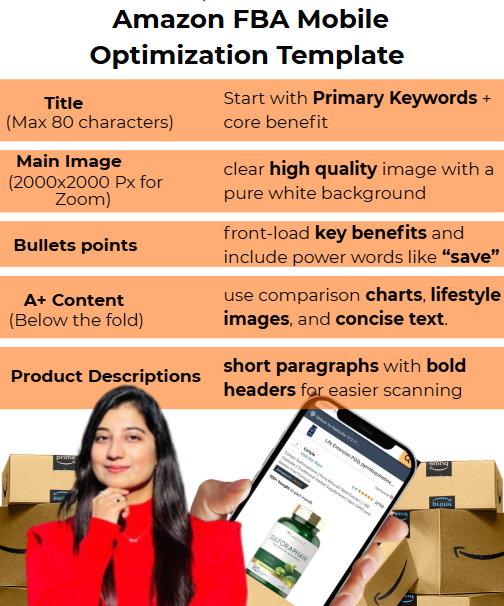
The structure that works for mobile-first titles in 2026: Lead with the primary keyword that reflects how buyers actually search for this product. Follow immediately with the single most important differentiating benefit. Include a critical qualifier (size, compatibility, material grade, or key feature) if it is a common purchase decision factor. Only then use remaining characters for secondary keywords.
Before: "BrandName Pro Series XR-7 Stainless Steel Insulated Travel Mug 16oz with Leakproof Lid, Handle, and Carry Bag"
After: "16oz Leakproof Insulated Travel Mug, Keeps Drinks Hot 12 Hours, BPA-Free Stainless Steel with Handle"
In the rewritten version, the mobile-visible characters communicate: what the product is (insulated travel mug), the primary benefit (leakproof, keeps drinks hot 12 hours), and a key trust signal (BPA-free). A buyer sees all of this without expanding. In the original version, the mobile-visible portion shows only "BrandName Pro Series XR-7 Stainless Steel Insulated Travel Mug," leaving the most important selling points invisible to anyone who does not scroll or expand the title.
Additional title rules for mobile in 2026: Avoid ALL CAPS and exclamation marks, which the algorithm now penalizes and which read as low quality to sophisticated buyers. Avoid promotional language like "best value" or "top rated" in the title itself, as these phrases consume characters better used for keywords. Write for the natural language patterns that Rufus AI now indexes alongside traditional keyword matching, because conversational phrasing outperforms keyword-stuffed structures in AI-driven search results.
4. Bullet Points: Designing for the Collapsed View
Mobile layouts on the marketplace app collapse bullet points by default. Most buyers see the first two bullets and must actively tap to expand the remaining three. This means that on mobile, you effectively have two bullets to make the core case for your product, not five.
The practical implication is significant. Most sellers write their bullets in descending order of importance as perceived from a desktop view: primary feature, secondary feature, third feature, with reassurance and trust signals at the end. On mobile, bullets four and five are invisible to a large percentage of buyers. If your trust signals (warranty, return policy, customer satisfaction guarantee) are in bullets four and five, most mobile buyers never see them.
Restructure your bullets for the mobile reality: the two most powerful, persuasion-critical statements belong in bullets one and two. The primary benefit that differentiates you from the most common competitors goes first. The trust signal or risk-removal statement that addresses the most common buyer hesitation goes second. Bullets three through five can carry important but lower-priority information for buyers who engage deeply.
Each bullet should follow the structure: Impact word in capitals, core benefit, feature that delivers the benefit, real-world outcome or use case. This structure communicates value in the scan pattern that mobile users actually apply, which is a rapid vertical movement down the screen rather than line-by-line reading.
Length matters critically on mobile. Long bullets create visual density that mobile users interpret as effort. A bullet that requires two lines of text on a phone screen should be rewritten to one. Concision is not about leaving information out. It is about delivering the same information in fewer words with greater impact.
Finally, include your most important secondary keywords in bullets one and two. Since these are the bullets that mobile shoppers see without expanding, they carry disproportionate weight both for buyer persuasion and for keyword indexing relevance signals.
5. The Image Gallery: Where Mobile Conversions Are Won or Lost
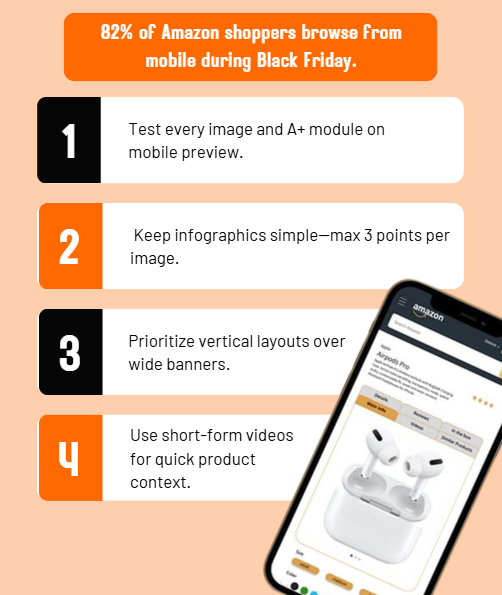
On a mobile screen, your image gallery is your listing. Before a buyer reads a word, they have processed your images. On mobile, the image gallery is often the primary and sometimes only element a buyer evaluates before making a purchase decision, particularly for products priced under a certain threshold where low-consideration impulse purchases dominate.
Sellers who invest in strong, mobile-optimized image galleries consistently see conversion rate improvements of 15 to 25 percent. Sellers who upload desktop-optimized infographics with small text and complex layouts often find those images actively hurting mobile performance.
The main image is the most important single element in the entire listing for mobile shoppers. It must communicate product quality and core identity at thumbnail size in search results, before the buyer has even reached the listing detail page. At thumbnail size, fine detail disappears. What remains is composition, lighting, color, and the impression of quality. Test your main image at a very small size to see exactly what mobile search result users actually see. If the product identity is not immediately clear, the image needs to be remade.
Infographic images require specific mobile adaptation. The most common infographic mistake is including text smaller than approximately 18 to 20 points, which becomes unreadable when an image is displayed at mobile scale. Limit each infographic to one primary message with no more than five to seven words of supporting text per element. Use high contrast text colors against backgrounds that do not compete with the message. Icons and visual representations of features outperform text descriptions of the same features at mobile scale.
Lifestyle images serve a different function on mobile than they do on desktop. On desktop, buyers zoom in to evaluate detail. On mobile, lifestyle images work primarily through emotional resonance: they create a visceral connection between the product and the buyer's own life. Prioritize lifestyle images that show the product in a use context that mirrors your core buyer's actual life as closely as possible. Research your top reviews to understand exactly which contexts, moments, and use cases buyers describe most frequently, then build lifestyle images around those specific scenarios.
Video is the highest-performing content format on mobile across all contexts, and product listings are no exception. Buyers on mobile spend significantly more time engaged with video content than with static images. A short 15 to 30 second product video showing the product in use, demonstrating its primary benefit, and closing with a clear value statement outperforms the same information presented in static form. For sellers with brand registration, video in the listing image gallery is an underutilized mobile conversion asset.
6. A+ Content for Mobile: Less is More
A+ Content occupies a critically different position in the mobile listing experience than it does on desktop. On desktop, A+ Content is supplementary, appearing below bullet points and reviews in a position that buyers reach only after engaging with the primary listing elements. On mobile, the content order shifts. A+ Content frequently appears more prominently relative to reviews, giving it greater influence over buyer decisions at exactly the moment when visual, easy-to-process information is most persuasive.
This mobile prominence makes A+ Content one of the highest-impact optimization investments available to Brand Registered sellers, and it makes mobile-specific A+ design essential rather than optional.
The most common A+ Content mistake on mobile is treating it like a desktop experience with smaller text. Long text blocks, copy-heavy modules, and layouts that rely on buyers reading paragraph-length descriptions fail on mobile because mobile users skim rather than study. Every text element in your A+ Content should be evaluated on the assumption that the buyer will read the headline and glance at the visual. If the value proposition is not communicated through that combination alone, the module is not optimized for mobile.
Mobile-first A+ Content principles: Use short, punchy headlines of three to seven words that can be read in a single glance. Lead with lifestyle visuals that establish emotional context before any copy appears. Use icon-based feature callouts instead of text-heavy feature descriptions. Keep each module to one clear message rather than trying to pack multiple points into a single section. Ensure all text is at minimum 18 to 20 points when scaled to mobile display size.
The brand story module in A+ Content is particularly powerful for mobile buyers because it addresses the trust dimension that anonymous products cannot satisfy. Mobile shoppers, who are making faster decisions with less research time, are especially susceptible to brand credibility signals. A brand story that communicates authentic origin, a clear purpose, or a distinct perspective on the product category creates a connection that generic competitor listings cannot match.
Comparison charts within A+ Content serve a specific mobile function: they allow buyers to evaluate multiple variants or product advantages in a format that is easier to process visually than reading the same information in text form. When designed with clear headers, minimal text, and high-contrast checkmarks or ratings, comparison charts work well at mobile scale and reduce the research friction that causes mobile abandonment.
7. Common Mobile Optimization Mistakes That Kill Conversions
Understanding what to build for mobile is important. Understanding what to actively avoid is equally critical, because many of the most damaging mobile listing mistakes are things sellers do not realize they are doing.
Designing on desktop and reviewing on desktop. The single most pervasive mistake. Sellers who build and evaluate their listings exclusively on desktop screens create a systematic blind spot for mobile performance. The fix is simple and non-negotiable: preview every listing change on a mobile device before publishing. Test on both iOS and Android, and on more than one screen size, because formatting that holds on a large-screen device can break on a smaller or older phone.
Front-loading the title with brand name or model number. When the brand is not one a buyer is actively searching for, leading with it consumes mobile-visible characters without delivering value to the shopper. Mobile buyers who do not recognize the brand name in the first 80 characters gain no useful information from seeing it there. Lead with the keyword and benefit. Move the brand name later in the title.
Infographics with small text. An infographic designed for desktop viewing at high resolution becomes an unreadable image on a mobile screen. Any text that requires zooming to read on a phone is not optimized for mobile. This is one of the most common image mistakes and one of the easiest to fix: increase text size, reduce the number of text elements per image, and increase contrast.
Burying trust signals in bullets four and five. Warranty information, satisfaction guarantees, and credibility statements that appear in the lower bullets are invisible to mobile buyers who do not expand the list. Move your strongest trust signal to bullet two.
Overloading A+ Content with text. Dense A+ modules with multiple paragraphs of copy create a wall of text that mobile buyers will not read. Every mobile A+ module should be evaluable by a buyer in under five seconds of scanning. If it requires more time than that to extract the core message, it is too long.
Not testing image readability at thumbnail size. Images that look excellent at full display size often fail at the thumbnail scale used in search results. Test every main image and key secondary image at small scale before finalizing. If the product identity and key message are not clear at thumbnail size, you are losing buyers before they reach your listing.
8. Voice Shopping and AI: The Next Mobile Frontier
Mobile-first optimization in 2026 extends beyond screen layout. Two emerging surfaces are reshaping how buyers discover and evaluate products from their mobile devices, and both require specific listing adaptation.
Voice commerce reached $151 billion in 2025, with 22 percent of consumers making purchases directly through voice assistants on mobile devices. Voice-based product discovery is categorically different from text search: voice queries are conversational, tend to be longer, and often describe use cases rather than product names. A buyer who types "insulated travel mug" into a search bar might say "voice assistant, what is the best travel mug that keeps coffee hot for four hours" to their phone. These two queries have the same intent but very different structures.
Listings optimized for voice discovery answer questions rather than just incorporating keywords. This means including natural-language descriptions of use cases, outcomes, and benefits in your title, bullets, and description that map to how buyers might verbally describe what they need. Backend search terms should include question-format long-tail phrases that buyers might use in voice searches.
The Rufus AI shopping assistant, which now handles hundreds of millions of queries daily, follows the same pattern. It reads your entire listing including title, bullets, description, A+ Content, and reviews to determine whether your product is the right answer to a shopper's natural-language question. Listings written as keyword templates perform worse in Rufus recommendations than listings written as conversations. The same principle that makes voice search optimization effective makes Rufus optimization effective: write for the way buyers actually talk about their needs, not just the terms they type.
9. The Mobile-First Optimization Checklist
Implementation matters as much as understanding. Here is the practical sequence for applying mobile-first optimization to any listing:
Step 1: Preview your current listing on a mobile device. Screenshot the search result thumbnail, the detail page above the fold, and the bullet point collapsed view. This is what your buyers actually see.
Step 2: Evaluate your title's first 80 characters. Do they communicate the product type, primary keyword, and at least one key benefit? If not, rewrite leading with that information.
Step 3: Rewrite bullets one and two as your most powerful conversion statements. Move your primary benefit to bullet one and your strongest trust signal to bullet two.
Step 4: Audit every image for mobile readability. Check main image at thumbnail size. Check all infographic text at mobile display scale. Replace any image with text that becomes unreadable at mobile size.
Step 5: Review A+ Content for text density. Identify any module that requires more than five seconds to extract the core message on mobile. Rewrite or restructure those modules.
Step 6: Test your changes on both iOS and Android. Confirm formatting consistency across different screen sizes.
Step 7: Track conversion rate for two to four weeks following each change to measure the direct impact of mobile optimization on sales performance.
Conclusion
The mobile mandate is not coming. It is here. With more than 75 percent of marketplace traffic already coming from mobile devices, and mobile commerce projected to represent an even larger share of transactions through 2026 and beyond, sellers who continue building for desktop are choosing to underperform the majority of their buyers every single day.
The changes required to optimize for mobile are not technically complex. They require a mindset shift: designing with the assumption that the buyer has eight seconds and a four-inch screen, not fifteen minutes and a full monitor. Every element of the listing, every word in the title, every bullet, every image, every line of A+ Content, must earn its place by delivering clear value at the scale and speed of a mobile shopping session.
The sellers who make this shift do not just improve their conversion rates on mobile. They improve organic rank (because the algorithm responds to better conversion signals), they reduce effective ad costs (because more clicks convert to sales), and they create a compounding competitive advantage in categories still dominated by desktop-optimized incumbents.
Mobile-first is where the next wave of marketplace growth will be captured. The sellers who internalize this will be positioned to take it.
Are your listings still built for a desktop world while your buyers shop on mobile?
At Brevlin, we specialize in mobile-first listing design that converts. From title architecture and bullet restructuring to image gallery audits and A+ Content built for small screens, we engineer listings that perform where the buyers actually are.
Start your mobile-first listing transformation with Brevlin.
A comprehensive guide to mobile-first listing optimization for marketplace sellers in 2026, covering mobile traffic statistics, the psychology of mobile shoppers, title architecture for the 80-character mobile window, bullet point restructuring for the collapsed mobile view, image gallery design, A+ Content for small screens, common mobile mistakes, voice and AI optimization, and a step-by-step audit checklist. Includes 5 FAQs and a CTA to Brevlin's listing optimization services.
I still review listings that were clearly built on a 27 inch monitor. Open your own listing on your phone before your next ad campaign. What you see in the first two bullets is your entire pitch to most buyers. — Maimoona Iqbal (Marketplace Growth Specialist)
Artikel fertig. Du hast gerade 21 Minuten in dein Wissen investiert.
Häufig gestellte Fragen
The practical limit for mobile-visible title text before truncation is approximately 80 characters, depending on the device and screen size. Since the majority of shoppers browse on mobile, you should treat 80 characters as your effective title limit and ensure the primary keyword and strongest benefit both appear within that window. Use the remaining characters for secondary keywords and additional details.
Mobile layouts collapse bullet points by default, showing the first two before requiring a tap to expand. This means bullets one and two are effectively your entire bullet section for a large percentage of mobile buyers. Your primary differentiating benefit belongs in bullet one. Your strongest trust signal or risk-removal statement belongs in bullet two. Bullets three through five serve engaged buyers who expand, but they should not carry information critical to the purchase decision.
Test every infographic at mobile display scale and at thumbnail size before publishing. Any text that requires zooming to read has failed the mobile standard. Limit text to five to seven words per element, use a minimum font size that reads clearly at mobile scale (approximately 18 to 20 points in the source design), maximize contrast between text and background, and focus each infographic on one primary message rather than trying to pack multiple points into a single image.
On mobile, A+ Content frequently appears more prominently relative to reviews than it does on desktop, giving it greater influence at the moment when buyers are making decisions. Because mobile users skim rather than read, well-designed A+ Content with short headlines, strong visuals, and icon-based feature callouts can be significantly more persuasive than text-heavy bullet points. Sellers with brand registration should treat A+ Content as one of their highest-priority mobile conversion investments.
Voice queries are conversational and describe use cases rather than product names. To optimize for voice discovery and the Rufus AI shopping assistant, write your listing copy as answers to buyer questions rather than as keyword templates. Include natural-language descriptions of use cases and outcomes in your title, bullets, and description. Add question-format long-tail phrases to backend search terms. Listings that answer how buyers verbally describe their needs outperform keyword-only optimized listings in both voice and AI-driven search.

.webp%3Fprefix%3Dcms%252Fbrevlin-site%252Fmedia&w=3840&q=75)

.webp%3Fprefix%3Dcms%252Fbrevlin-site%252Fmedia&w=3840&q=75)


